Education
15 years in education. Built curriculum, interactive tools, LMS systems, and taught thousands of students.
15 Years in Education
Education represents 75% of my work—from curriculum development to interactive tools, from Learning Management Systems to hands-on teaching. This work spans multiple disciplines and delivery methods, showing the breadth and depth of what I've built and taught.
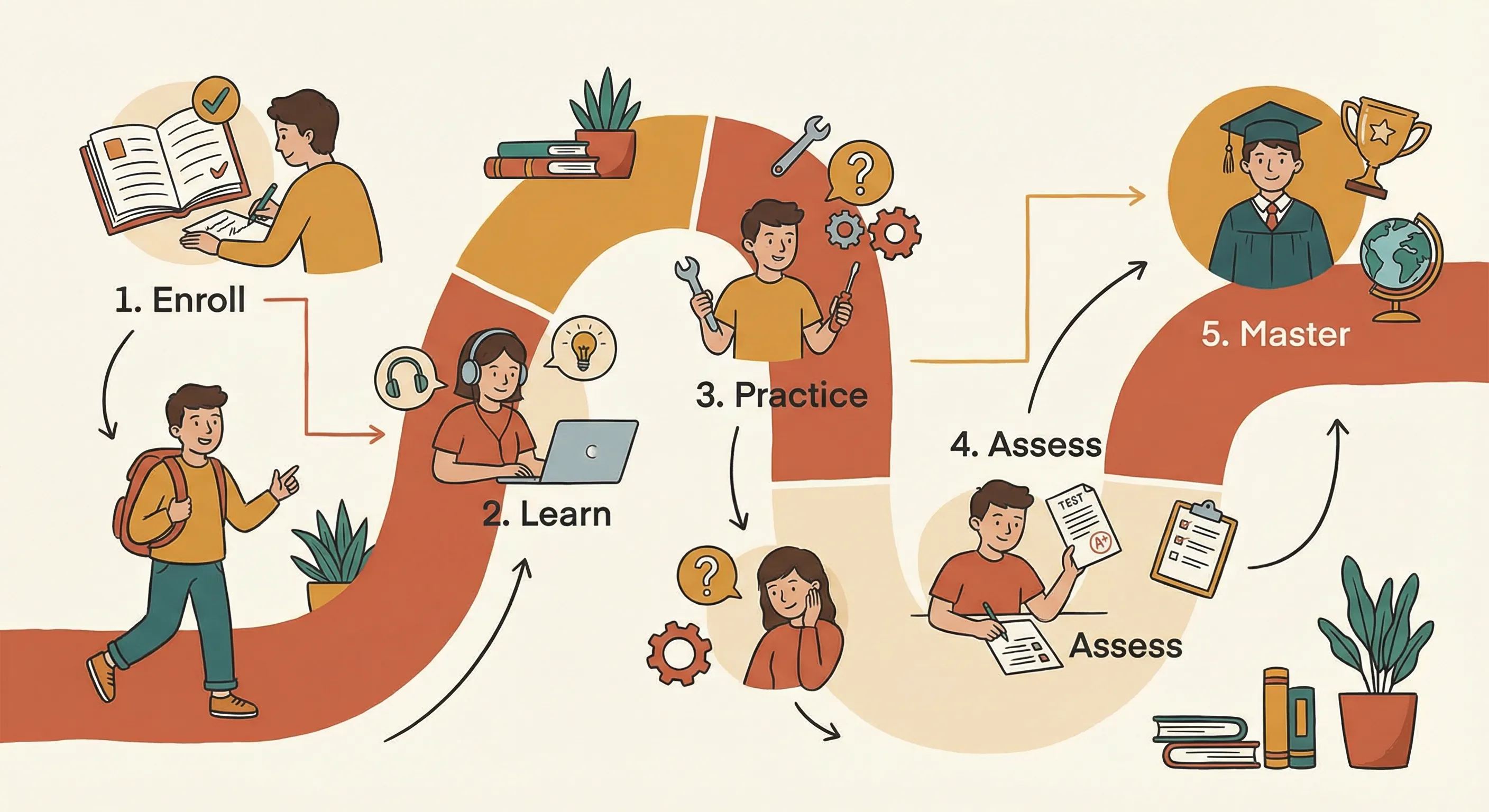
Designing clear pathways from enrollment to mastery
Impact: Over 15 years, I've designed curricula, built learning systems, created interactive tools, and taught thousands of students across UX/UI, Product Design, Graphic Design, and Typography.
Teaching Philosophy
Effective learning happens when theory meets practice, when complex topics become approachable, and when students can experiment, make mistakes, and learn through doing. My approach combines instructional design principles with product thinking and technical implementation.
Learner-Centered Design
Every learning experience starts with understanding the learner. I design curriculum and tools that meet students where they are, building on prior knowledge and creating clear pathways to mastery.
Making Complex Topics Accessible
The best educational design breaks down complexity without oversimplifying. I focus on scaffolding concepts, using clear examples, and creating opportunities for practice and immediate feedback.
Technology as Enabler
Educational technology should enhance learning, not complicate it. Whether building Learning Management Systems or interactive tools, I work to create interfaces and experiences that are intuitive, accessible, and effective.
Hands-On Practice
Passive reading can only take you so far. I design tools and exercises that create opportunities for active practice, allowing learners to experiment, make mistakes, and build real skills through doing.
Key Accomplishments
- 15+ years designing and delivering educational experiences
- Developed curricula based on evolving industry trends and learner needs across UX/UI, Product Design, Graphic Design, and Typography
- Collaborated with educators and engineers on Learning Management Systems
- Built Learning Management Systems connecting 5,000+ students with faculty
- Created interactive learning tools for hands-on practice and visual recognition
- Designed learning pathways from enrollment to mastery
- Applied learning science principles to improve retention and engagement
- Balanced UX, accessibility, and educational outcomes in all design decisions
Work Types
My educational work spans four main areas:
Curriculum Design
Course development, learning pathways, and teaching materials across multiple design disciplines. Creating structured learning experiences that build skills progressively.
Interactive Tools
Hands-on learning tools that provide immediate feedback and scaffold complexity. Tools like the Typography Classification Quiz that make practice engaging and effective.
LMS & Systems
Learning Management Systems and educational technology platforms that connect students with faculty, streamline workflows, and track progress.
Teaching Examples
Sample exercises, assignments, and visual teaching materials that demonstrate teaching style and approach across different subjects.
Skills Demonstrated
- Curriculum development and instructional design
- Learning Management System (LMS) design
- Interactive tool development and product thinking
- Pedagogical theory and learning science
- Accessibility and inclusive design
- Content strategy and information architecture
- Stakeholder collaboration (educators, students, administrators)
- React, TypeScript, and modern web development
Curriculum Design
Course development and learning pathways that make complex topics approachable. I design curricula that scaffold concepts, build on prior knowledge, and create clear pathways from enrollment to mastery. Work at the intersection of pedagogy and product—designing curriculum and tools that make complex topics feel approachable.
Impact: Developed curricula based on evolving industry trends and learner needs, creating learning pathways that connect thousands of students with faculty and industry standards.
Subject Areas
I've developed curricula across multiple design disciplines, creating learning pathways that connect students from enrollment to mastery:
UX/UI Design
User experience and interface design courses covering research, wireframing, prototyping, and usability testing. Focus on user-centered design processes and industry-standard tools. Curricula designed to build skills progressively from fundamentals to advanced application.
Product Design
Product design curriculum covering ideation, validation, design systems, and product strategy. Emphasis on balancing user needs with business goals. Learning pathways that scaffold from concept to execution.
Graphic Design
Visual design fundamentals, typography, layout, and brand identity. Building strong foundations in visual communication and design principles. Curricula that develop both technical skills and visual thinking.
Typography
Type classification, hierarchy, readability, and expressive typography. Developing visual recognition skills and understanding of type as a design element. Courses that combine theory with hands-on practice through tools like the Typography Classification Quiz.
Instructional Design Approach
Effective curriculum design requires understanding both the subject matter and the learner journey. My approach combines pedagogical theory with practical application.
Learner-Centered Design
Effective learning experiences start with understanding the learner. I design curriculum that meets students where they are, building on prior knowledge and creating clear pathways to mastery.
Making Complex Topics Accessible
The best instructional design breaks down complexity without oversimplifying. I focus on scaffolding concepts, using clear examples, and creating opportunities for practice and feedback.
Curriculum Development Process
Effective curriculum design requires understanding both the subject matter and the learner journey:
- Needs Assessment: Understanding learner backgrounds, industry requirements, and learning objectives
- Learning Pathway Design: Creating clear progression from fundamentals to advanced concepts
- Scaffolding: Breaking down complexity into manageable steps
- Practice Opportunities: Building in hands-on exercises and projects
- Assessment Design: Creating meaningful ways to measure learning
- Iteration: Refining based on student feedback and outcomes
Learning Outcomes
Curricula are designed to achieve specific learning outcomes, balancing UX, accessibility, and educational outcomes in all design decisions:
- Students can apply design principles to real-world projects
- Students develop visual recognition and critical analysis skills
- Students understand industry-standard processes and tools
- Students can communicate design decisions effectively
- Students build portfolios that demonstrate competency
- Students connect with faculty and peers through structured learning pathways
Key Accomplishments in Curriculum Design
- Developed curricula based on evolving industry trends and learner needs
- Created learning pathways that connect 5,000+ students with faculty
- Applied learning science principles to improve retention and engagement
- Balanced UX, accessibility, and educational outcomes in curriculum design
- Designed progressive learning sequences from fundamentals to advanced application
Curriculum Development Process
Effective curriculum design requires understanding both the subject matter and the learner journey. My process combines pedagogical theory with practical application:
1. Needs Assessment
Understanding learner backgrounds, industry requirements, and learning objectives. This includes analyzing student skill levels, identifying knowledge gaps, and researching current industry standards and tools.
2. Learning Objective Definition
Creating clear, measurable learning objectives that define what students will be able to do after completing the curriculum. Objectives are specific, achievable, and aligned with industry needs.
3. Learning Pathway Design
Creating clear progression from fundamentals to advanced concepts. Pathways show how concepts build on each other, with prerequisites clearly identified and recommended sequences provided.
4. Content Development
Developing course materials, exercises, and assessments that support learning objectives. Content includes lectures, readings, hands-on exercises, projects, and assessment rubrics.
5. Iteration and Refinement
Refining curriculum based on student feedback, learning outcomes, and evolving industry needs. Regular updates ensure content stays current and effective.
Industry Alignment
Curricula are designed to align with current industry practices and tools:
Tool Integration
Courses incorporate industry-standard tools like Figma, Adobe Creative Suite, and modern development frameworks. Students learn tools they'll actually use in their careers.
Process Alignment
Teaching methods mirror real-world design processes—from research and ideation to iteration and launch. Students experience workflows they'll encounter in professional settings.
Portfolio Development
Projects are designed to produce portfolio-quality work. Students graduate with case studies and projects that demonstrate their skills to potential employers.
Industry Connections
Curricula include opportunities to connect with industry professionals through guest lectures, portfolio reviews, and networking events. These connections help students understand industry expectations and build professional relationships.
Interactive Tools
Hands-on learning tools that provide immediate feedback and scaffold complexity. These tools demonstrate the intersection of instructional design, product thinking, and technical implementation.
Impact: Created interactive learning tools that help students develop visual recognition and practical skills through hands-on practice with immediate feedback.
Typography Classification Quiz
An interactive web-based tool for developing visual recognition skills in font classification. Practice identifying typefaces by their characteristics through hands-on exercises with immediate feedback.
Key Features
- Visual font classification exercises that train recognition skills
- Immediate feedback on answers to accelerate learning
- Progressive difficulty that scaffolds complexity
- Hands-on practice format that makes learning engaging
Technical Implementation
Built with React and TypeScript using Vite for fast development and optimized builds. The quiz uses a drag-and-drop interface for interactive classification exercises, with real-time feedback and progress tracking.
Teaching Philosophy for Tools
Effective learning happens through practice, not just theory. I design tools that provide immediate feedback, scaffold complexity, and create opportunities for hands-on experimentation. The best educational tools feel like play while building real skills.
Interactive Learning
Passive reading can only take you so far. Interactive tools create opportunities for active practice, allowing learners to experiment, make mistakes, and learn through doing. This hands-on approach accelerates skill development and improves retention.
Visual Recognition
Many design skills require developing a trained eye—recognizing patterns, understanding relationships, and building visual memory. These tools help accelerate that process through structured practice with immediate visual feedback.
Immediate Feedback
Learning accelerates when feedback is instant. These tools provide real-time responses that help learners understand what they're getting right and where they need to focus. Immediate correction prevents bad habits from forming.
Progressive Difficulty
Tools scaffold complexity, starting with simple exercises and gradually introducing more challenging concepts. This progressive approach builds confidence while ensuring students master fundamentals before moving to advanced topics.
Future Tools in Development
Additional interactive learning tools are planned to expand hands-on practice opportunities:
Color Theory Quiz
An interactive tool for practicing color relationships, harmony, and contrast. Students will practice identifying color schemes, adjusting saturation and brightness, and creating harmonious palettes.
Layout Composition Tool
A hands-on exercise for experimenting with grid systems, alignment, and visual hierarchy. Students will practice arranging elements and seeing how composition choices affect readability and visual impact.
Design System Builder
An interactive tool for learning design system principles. Students will practice creating components, establishing tokens, and understanding how systems scale across products.
LMS & Systems
Learning Management Systems and educational technology platforms that enhance education rather than complicate it. I design interfaces that are intuitive for both students and faculty, balancing feature richness with usability.
Impact: Designed learning experiences and an LMS that better connected students and faculty, serving 5,000+ students with streamlined workflows and accessible learning materials.
Educational Technology
Shipped an LMS connecting 5,000+ students with faculty members. The platform focused on creating clear communication channels, streamlined assignment workflows, and accessible learning materials.
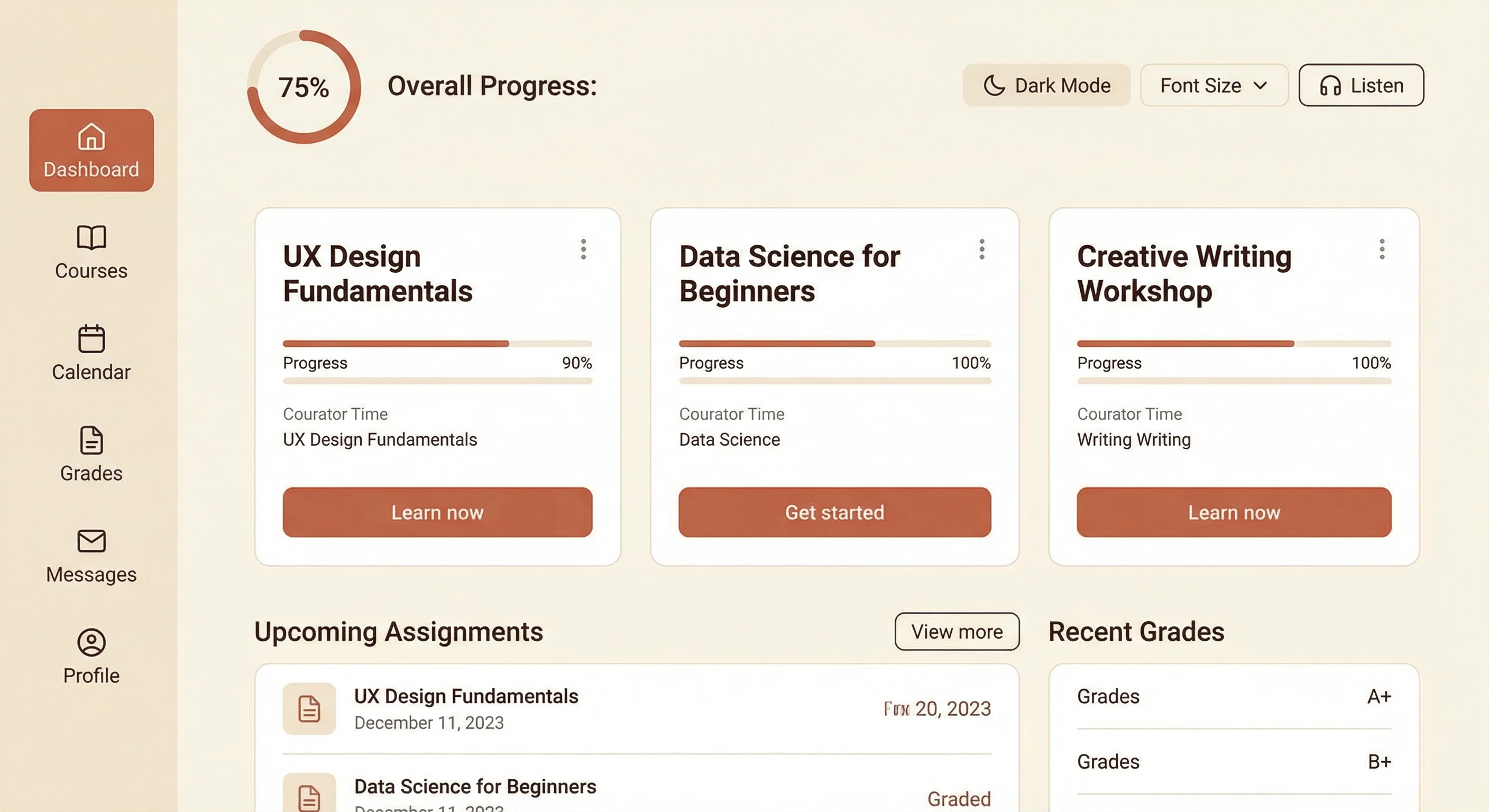
Intuitive LMS connecting 5,000+ students with faculty
Key Features
- Intuitive course navigation and content organization
- Assignment submission and grading workflows
- Discussion forums for peer-to-peer learning
- Accessibility features for diverse learners
- Analytics to track student progress and engagement
Design Approach
Learning Management Systems should enhance education, not complicate it. I work to design interfaces that are intuitive for both students and faculty, balancing feature richness with usability.
Technology as Enabler
Learning Management Systems should enhance education, not complicate it. I collaborated with educators and engineers to design interfaces that are intuitive for both students and faculty, balancing feature richness with usability.
Student-Faculty Connection
The platform creates clear communication channels between students and faculty, making it easy to ask questions, get feedback, and stay connected throughout the learning journey. This collaboration between educators and engineers resulted in a system that better connected 5,000+ students with faculty.
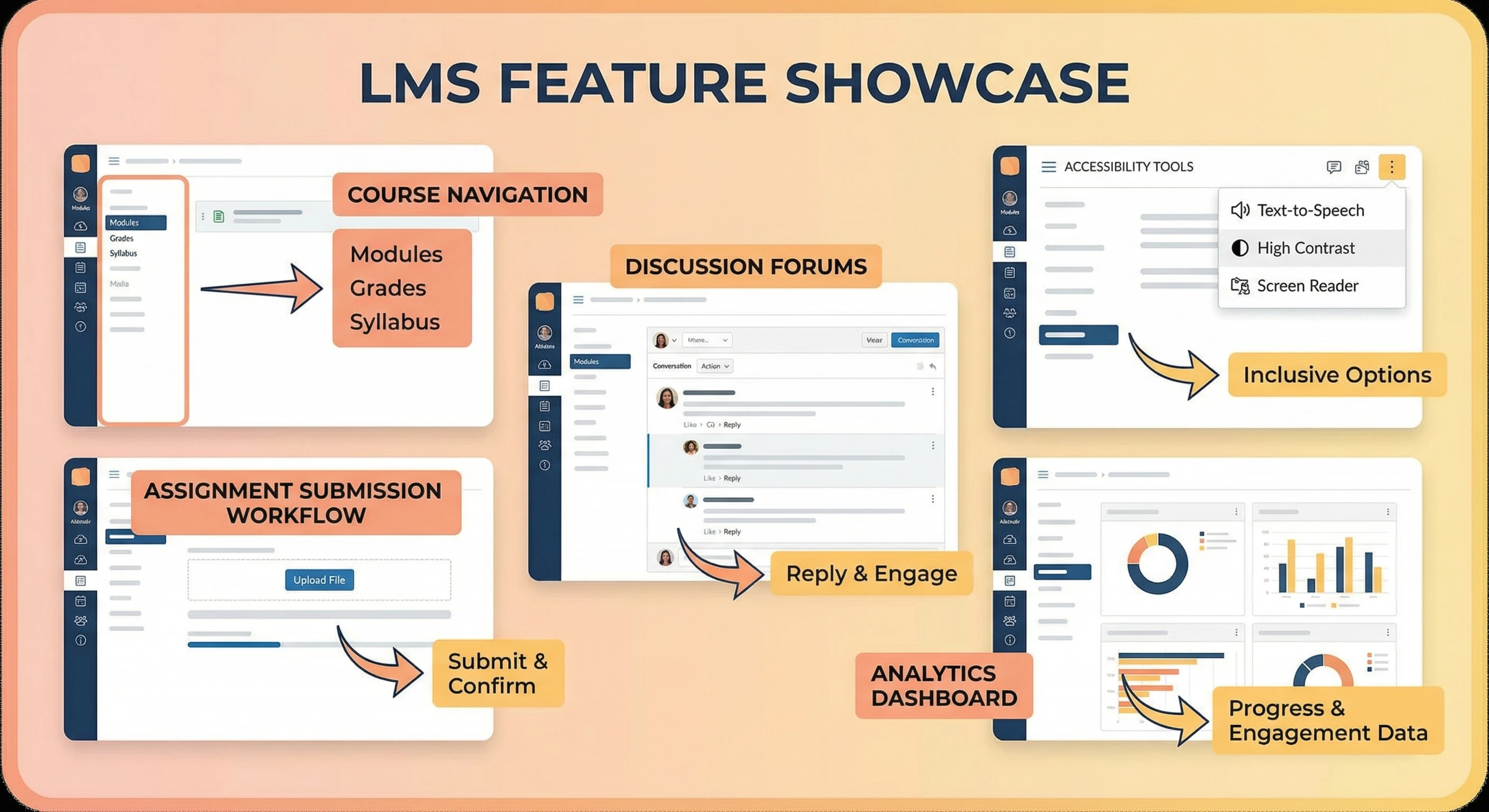
Key features: course navigation, assignments, discussions, accessibility, and analytics
Accessibility First
Accessibility features are built in from the start, ensuring diverse learners can access and benefit from the platform. I balanced UX, accessibility, and educational outcomes in all interface decisions. This includes keyboard navigation, screen reader support, and high contrast options.
Analytics & Progress Tracking
Built-in analytics help both students and faculty track progress, identify areas for improvement, and celebrate achievements. Data-driven insights support better learning outcomes and help identify where students need additional support.
Learning Pathways
Created learning pathways that connect students from enrollment to mastery. The system guides students through their educational journey, providing clear next steps and support along the way.
Designing clear pathways from enrollment to mastery
Enrollment to Onboarding
The learning pathway begins with clear onboarding that helps students understand course expectations, available resources, and how to navigate the LMS. This initial phase sets students up for success.
Progressive Skill Building
Courses are structured to build skills progressively, with each module building on previous concepts. Learning pathways clearly show prerequisites and recommended sequences, helping students understand how concepts connect.
Milestone Checkpoints
Regular checkpoints throughout the learning journey help students assess their progress and identify areas for improvement. These milestones provide opportunities for reflection and course correction.
Mastery and Application
The pathway culminates in comprehensive projects that apply multiple concepts together. These capstone experiences prepare students for real-world application and portfolio development.
Student Success Metrics
The LMS tracks key metrics to support student success:
- Engagement: Time spent in course materials and participation in discussions
- Progress: Completion rates for assignments and modules
- Performance: Grades and assessment scores across different topics
- Support: Frequency of questions and use of help resources
These metrics help identify students who may need additional support and celebrate those who are excelling. Faculty can use this data to improve course materials and provide targeted assistance.
Leadership & Mentorship
Leading design teams, mentoring students, and establishing design systems. A look at how I've led cross-functional teams, built design systems, and shaped product strategy while teaching and mentoring designers at all levels.
Impact: Helped ship cohesive product experiences by establishing shared design standards, implementing design systems in code, and partnering closely with engineering teams. Mentored hundreds of designers, helping them grow their craft and transition into professional roles.
Key Accomplishments
- Defined and socialized design principles to align product, design, and engineering teams
- Established reusable design systems in code (React, TypeScript) informed by real product constraints
- Mentored designers on design-to-code workflows and collaborated with engineers to ship polished interactions
- Led cross-functional initiatives to improve product quality and user experience
- Built processes for design reviews, critique, and feedback cycles
- Mentored hundreds of students transitioning from learning to professional practice
Leadership Approach
Building Shared Understanding
Effective design leadership starts with alignment. I work to create shared vocabulary and principles that help teams make consistent decisions without constant oversight. In educational settings, this translates to clear learning objectives and design principles that guide student work.
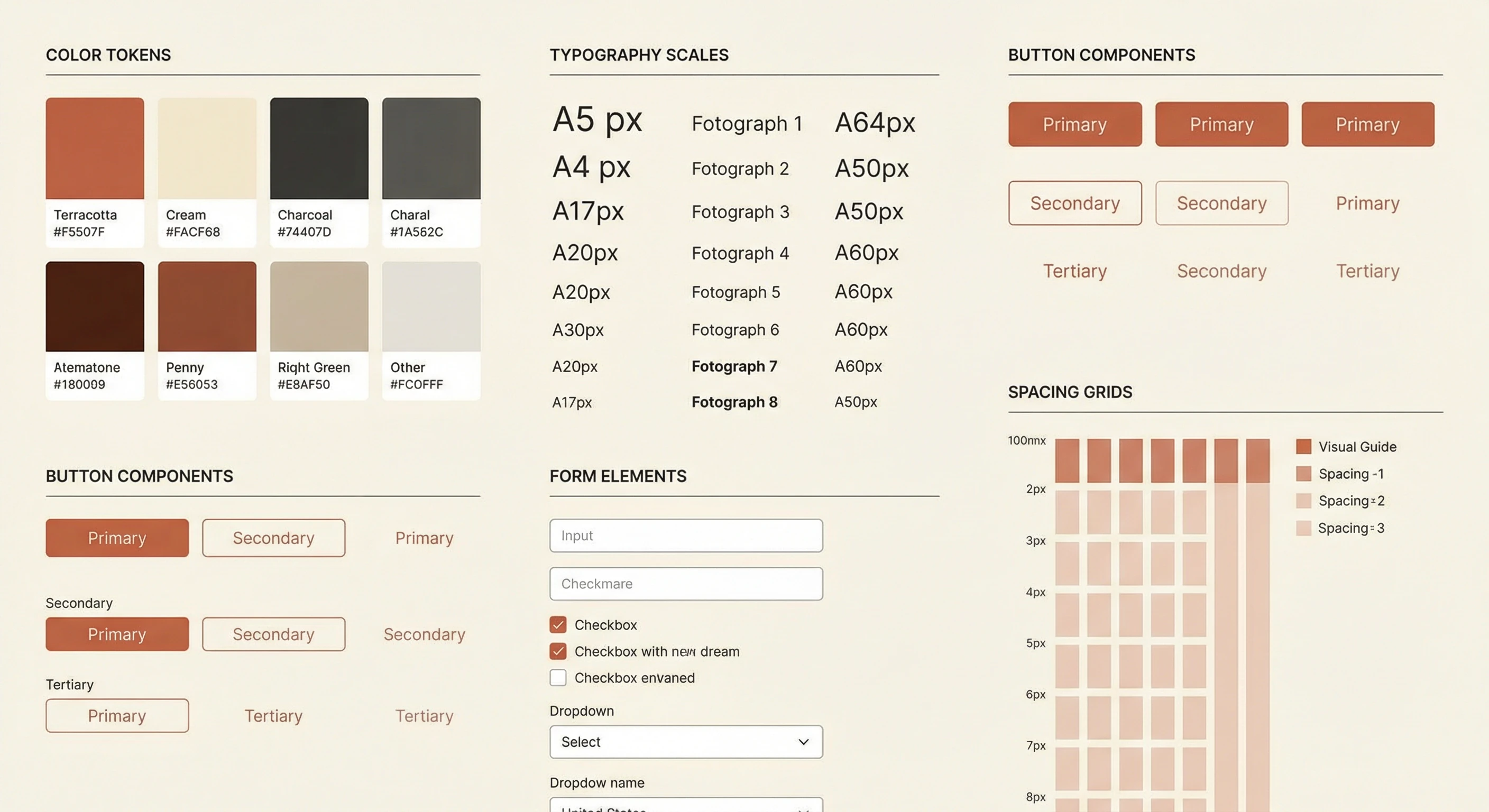
Building reusable design systems that scale across products and educational contexts
Systems Thinking
Rather than solving problems one-off, I focus on building reusable patterns and components that scale across products. This means establishing design systems that work for both designers and engineers. In education, this approach helps create consistent learning experiences and reusable teaching materials.
Collaboration & Mentorship
Great products come from great teams, and great designers come from great mentorship. I invest in mentoring designers at all levels—from students learning their first design principles to experienced designers transitioning into leadership roles. I partner closely with engineering to ensure designs are both beautiful and buildable.
Design Systems Leadership
I've established and implemented reusable design systems in code (React, TypeScript) that inform both product work and educational content. These systems create consistency and efficiency across teams and learning experiences.
Component Libraries
Built component libraries and design tokens that map cleanly to engineering implementation. These systems speed up development while maintaining design quality, and they serve as teaching tools for students learning to bridge design and code.
Design Principles
Defined and socialized design principles that align product, design, and engineering teams. These principles guide decision-making and create shared understanding across disciplines. In educational contexts, they help students understand how professional design teams operate.
Process & Workflow
Built processes for design reviews, critique, and feedback cycles that improve quality and efficiency. These processes are taught to students, helping them understand professional workflows and prepare for industry roles.
Mentorship in Education
Mentorship is central to my educational work. I mentor students transitioning from learning to professional practice, helping them build portfolios, develop skills, and navigate career transitions.
Portfolio Development
I help students develop portfolios that demonstrate their skills and tell compelling stories. This includes guidance on case study structure, visual presentation, and technical implementation.
Career Transition Support
Mentoring students through career transitions—from learning design to landing their first roles. This includes resume development, interview preparation, and understanding industry expectations.
Design-to-Code Workflows
Teaching designers how to bridge design and code, helping them understand technical constraints and collaborate effectively with engineering teams. This mentorship prepares students for modern design roles.
Cross-Functional Collaboration
Leading cross-functional teams requires understanding multiple perspectives and creating alignment. I've led initiatives that bring together design, engineering, product, and education stakeholders.
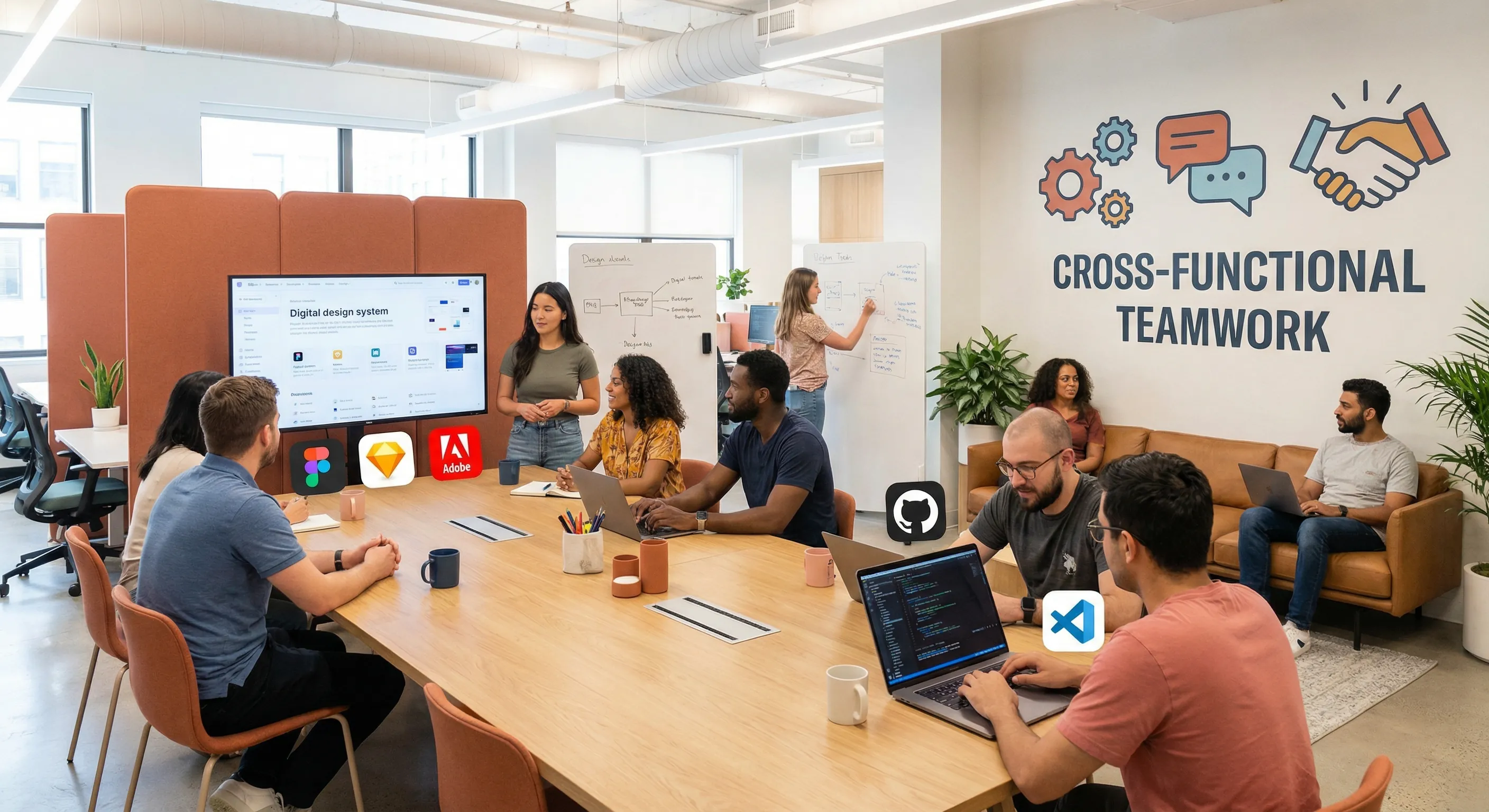
Leading cross-functional teams to ship cohesive product experiences
Stakeholder Alignment
Creating alignment between different stakeholders—educators, administrators, students, and industry partners. This requires clear communication, shared goals, and understanding of different perspectives.
Process Optimization
Building processes that improve efficiency and quality. This includes design review workflows, feedback cycles, and collaboration tools that help teams work together effectively.
Skills Demonstrated
- Team leadership and management
- Design system development and implementation
- Cross-functional collaboration
- Strategic planning and product vision
- Design process and workflow optimization
- Mentorship and skill development
- Portfolio and career guidance
- Stakeholder management and alignment
Teaching Examples
Sample exercises, assignments, and visual teaching materials that demonstrate teaching style and approach across different subjects. These examples show how complex topics are broken down into approachable, hands-on learning experiences.
Approach: Teaching examples span multiple disciplines—Typography, UX/UI, Product Design, and Graphic Design—demonstrating consistent teaching philosophy across subjects.
UX/UI Design Teaching Examples
User experience and interface design courses covering research, wireframing, prototyping, and usability testing. Focus on user-centered design processes and industry-standard tools.
User Research Exercises
Students learn to conduct effective user interviews, create personas, and map user journeys. Exercises include structured interview guides, synthesis workshops, and journey mapping sessions that build research skills progressively.
Wireframing & Prototyping
Hands-on exercises in Figma and other design tools teach students to translate research insights into low-fidelity wireframes, then evolve them into interactive prototypes. Projects scaffold from simple layouts to complex multi-screen applications.
Usability Testing
Students practice moderating usability tests, analyzing results, and iterating based on findings. Exercises include test script development, observation techniques, and synthesis methods that build confidence in user testing.
Product Design Teaching Examples
Product design curriculum covering ideation, validation, design systems, and product strategy. Emphasis on balancing user needs with business goals.
Ideation Workshops
Structured brainstorming sessions teach students to generate diverse ideas, evaluate concepts, and select promising directions. Exercises include "How Might We" framing, constraint-based ideation, and concept selection frameworks.
Design System Projects
Students build comprehensive design systems from scratch, learning to create reusable components, establish design tokens, and document patterns. Projects progress from basic component libraries to full system implementations with code.
Product Strategy Case Studies
Analysis of real-world products helps students understand how design decisions connect to business goals. Case studies cover product launches, pivots, and scaling challenges across different industries.
Teaching Style
My teaching examples reflect a consistent approach:
Breaking Down Complexity
Complex topics are broken into manageable steps, with clear examples and progressive difficulty. Students build understanding incrementally.
Visual Learning
Visual examples and demonstrations help students see concepts in action. Visual recognition exercises build the trained eye needed for design work.
Hands-On Practice
Every concept includes opportunities for practice. Exercises range from quick drills to comprehensive projects that apply multiple concepts.
Real-World Application
Examples connect theory to practice, showing how concepts apply to real design problems and industry scenarios.
Typography Teaching Examples
Type classification exercises, hierarchy studies, readability analysis, and expressive typography projects. Building visual recognition and understanding of type as a design element.
Type Classification Exercises
Students practice identifying typefaces by their characteristics—serif vs. sans-serif, old style vs. transitional, humanist vs. geometric. Exercises use the Typography Classification Quiz tool for hands-on practice with immediate feedback.
Hierarchy Studies
Projects teach students to create clear visual hierarchy through type size, weight, and spacing. Exercises include redesigning existing layouts and creating new compositions that guide the eye effectively.
Readability Analysis
Students analyze text blocks for optimal readability, experimenting with line length, leading, and font choices. Projects include comparing different type treatments and measuring readability metrics.
Expressive Typography
Advanced projects explore type as a visual element, creating expressive compositions that communicate mood and meaning. Students experiment with letterforms, spacing, and composition to create impactful typographic designs.
Graphic Design Teaching Examples
Visual design fundamentals, layout exercises, brand identity projects, and composition studies. Building strong foundations in visual communication.
Layout Exercises
Students learn grid systems, alignment principles, and visual balance through structured layout exercises. Projects progress from simple single-page layouts to complex multi-page documents.
Brand Identity Projects
Comprehensive brand identity projects teach students to develop visual systems that communicate brand values. Exercises include logo design, color palette development, and brand guideline creation.
Composition Studies
Visual composition exercises help students understand how elements work together to create effective designs. Projects explore balance, contrast, rhythm, and unity through hands-on practice.
Exercise Types
Teaching examples include various exercise types designed to build skills progressively:
Quick Drills
Short exercises for practicing specific skills—like identifying type classifications or sketching wireframes. These quick drills build muscle memory and recognition skills through repetition.
Visual Recognition
Exercises that develop the trained eye needed for design work. Students practice identifying design patterns, analyzing compositions, and recognizing quality through structured observation exercises.
Project-Based Learning
Comprehensive projects applying multiple concepts together. Students work on real-world scenarios, applying research, ideation, design, and iteration skills in integrated projects that mirror professional work.
Case Studies
Analysis of real-world design examples helps students understand how theory applies in practice. Case studies cover successful products, design systems, and design processes from leading companies.
Critique Exercises
Structured feedback and analysis practice builds students' ability to give and receive constructive criticism. Exercises teach students to articulate design decisions and evaluate work objectively.
Student Outcomes
Teaching examples are designed to achieve specific learning outcomes:
- Technical Skills: Students master industry-standard tools and processes
- Critical Thinking: Students learn to analyze, evaluate, and make informed design decisions
- Visual Literacy: Students develop the trained eye needed to recognize quality design
- Communication: Students learn to articulate design decisions and give constructive feedback
- Portfolio Development: Exercises produce work suitable for professional portfolios
- Professional Readiness: Students graduate with skills and confidence to enter the industry